Everyone who joins the Testlio platform needs a verified phone number. You add and verify your phone number during registration or later on your profile.
Select your country's phone code from the available list and enter your phone number.
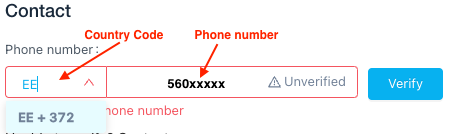
Select your country's phone code by entering your phone code (such as +372 for Estonia) or the ALPHA-2 country code (such as EE for Estonia).
Reasons for Rejection
A phone number could be rejected for one of the following reasons:
Format: If the number was entered in an incorrect format, it is rejected with an error message.
Duplication: If an account with that number already exists in the Testlio platform, you are prompted to recover your existing account rather than creating a new one. As stated in the Freelancer Services Agreement, you can have only one account on the Testlio platform.
Troubleshooting
Tips if you're not receiving the verification SMS:
Double-check and make sure you have entered the correct phone number.
Some phone operators block incoming text messages, try contacting your phone operator.
SMS apps often have Spam folders.
If possible, add our number (+14156882231) to your known contacts or any allow list your phone has.
Send a message to our number (+14156882231) so that your messaging app & carrier know it’s a trusted number.
The carrier may have an error and the text message may not have been sent out successfully. Feel free to contact our support team if you have unsuccessfully tried to verify yourself 5 times in 24 hours.
#TestlioBot
Was this article helpful?
That’s Great!
Thank you for your feedback
Sorry! We couldn't be helpful
Thank you for your feedback
Feedback sent
We appreciate your effort and will try to fix the article